

Gemini Spark: Google’s 24/7 AI Agent, Explained
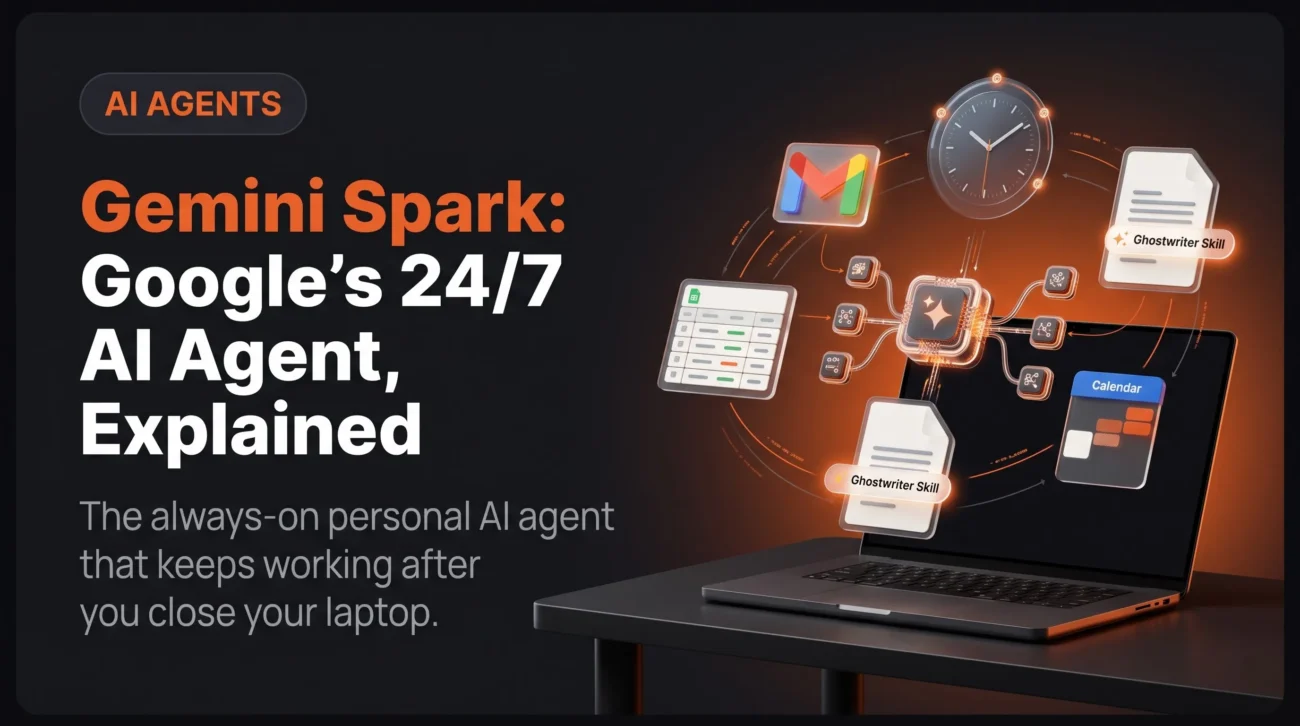
Gemini Spark is Google’s personal AI agent that keeps working after you close your laptop. Announced at Google I/O on 19 May 2026 and expanded to Google AI Pro subscribers across 160+ countries; including India – on 30 July 2026, Spark is not another chat window. It runs on dedicated virtual machines inside Google Cloud, connects natively to Gmail, Calendar, Drive, Docs, Sheets and Slides, and executes multi-step work on a schedule or a trigger while your phone sits locked in your pocket. This guide covers exactly what Spark does, how its Task–Skill–Schedule model works, what it costs in India, where it still falls short, and how to build your first working agent today.1
Key Takeaways
- What it is: A cloud-persistent AI agent inside the Gemini app that completes multi-step tasks without you watching.
- What powers it: Gemini 3.6 Flash on Google’s Antigravity agent harness, running in isolated Google Cloud virtual machines.
- Who can use it: Google AI Pro and AI Ultra subscribers, aged 18 or over, on a personal Google Account.
- India pricing: ₹1,950/month for AI Pro; AI Ultra from ₹6,500/month. Not available on the free or AI Plus tiers.
- The catch: Chrome auto browse; the headline feature remains US-only as of August 2026.
What Is Gemini Spark?
Gemini Spark is Google’s always-on personal AI agent, available inside the Gemini app to paid AI Pro and AI Ultra subscribers. Instead of answering a single prompt, it accepts a goal, plans the subtasks, calls the tools it needs across Google Workspace, and finishes the work in the background; even when every one of your devices is switched off.
The distinction matters more than the marketing suggests. A traditional chatbot is stateless and session-bound: it wakes when you type, answers once, and forgets. That model forces you to copy data between apps, re-explain your preferences every session, and supervise every step. Spark inverts this. Its internal state persists across sessions, so it can run long-horizon operations spanning days; monitoring an inbox, tracking a price, maintaining a spreadsheet and resume exactly where it stopped.
Google’s own framing is deliberately restrained about autonomy. Spark works “under your direction”, and the company has built hard stops into anything irreversible.
Spark can use your logged-in accounts and saved passwords to handle tedious web errands while protecting against threats like prompt injection and keeping you in the loop on sensitive actions, such as payments, by handing the task back to you.
How Gemini Spark Actually Works
Gemini Spark runs on isolated, ephemeral virtual machines inside Google Cloud rather than on your device, which is why tasks continue after your laptop closes. It is powered by Gemini 3.6 Flash and orchestrated by Google’s Antigravity agent harness, which decomposes a goal into subtasks and dispatches parallel subagents to execute them.
Cloud-persistent execution, not local processing
When a Spark task fires, Google Cloud spins up an isolated, ephemeral virtual machine dedicated to that session. The agent executes commands and browses inside that remote environment, and the machine is torn down when the session ends.
Two consequences follow. First, the “laptop closed, phone locked” promise is literal your scheduled 7:00 AM briefing runs whether or not any device is awake. Second, it forms a genuine security boundary: if Spark encounters a malicious file or webpage, the payload stays confined to a disposable cloud machine instead of reaching your hardware.
  TRIGGER              AGENT LOOP                  OUTPUT
  ─────────            ────────────                ────────
  Time-based    →      Plan the task         →     Google Doc
  (7:00 AM)            Spin up subagents           Google Sheet
                       Call Workspace APIs         Gmail draft

  Event-based   →      Approval gate         →     Waits for you
  (new email)          (payments · sends)
The models behind Spark
Spark launched on Gemini 3.5 Flash and now runs on Gemini 3.6 Flash, released 21 July 2026. Google chose the Flash tier deliberately: background agent loops require dozens of sequential model calls per task, and frontier-tier token pricing would make always-on execution financially unviable.
The bet holds up on the published numbers. On Google DeepMind’s model card, Gemini 3.5 Flash outscored the larger Gemini 3.1 Pro across the entire agentic suite:
| Benchmark | What it measures | Gemini 3.5 Flash | Gemini 3.1 Pro |
|---|---|---|---|
| Terminal-Bench 2.1 | Agentic coding in a sandbox | 76.2% | 70.3% |
| MCP Atlas | Tool-calling reliability | 83.6% | 78.2% |
| Finance Agent v2 | Domain-specific agent tasks | 57.9% | 43.0% |
| GDPval-AA | Real-world economic utility (Elo) | 1656 | 1314 |
| CharXiv Reasoning | Charts, plots, technical diagrams | 84.2% | — |
The MCP Atlas figure is the one that matters most for Spark. It measures how reliably a model chains multi-step tool calls without stalling on a malformed or out-of-order request the practical difference between an agent that finishes a fourteen-step workflow and one that quietly dies at step six.
A Task is what. A Skill is how. A Schedule is when. Get those three right and Spark stops being a demo.
Tasks, Skills and Schedules: The Three Building Blocks
Gemini Spark’s automation logic rests on three primitives: a Task is the goal you want completed, a Skill is the reusable method Spark should follow, and a Schedule is the time or event trigger that fires it. Almost every complaint about Spark underperforming traces back to using only one of the three.
1. Tasks: the “what”
A Task is a complete objective, not a question. “Find and track interior design internships in Ahmedabad for this summer” is a Task. “What is an internship?” is a prompt. Spark analyses the goal, maps a plan of subtasks, and executes them sequentially across your connected apps.
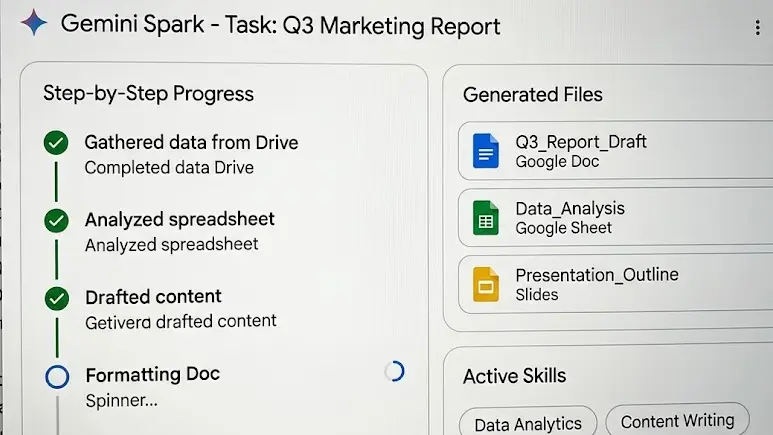
Every running Task exposes a work panel with four views: Progress (a step-by-step timeline), Files (everything Spark read or wrote), Schedules, and Skills & apps. Check Progress before assuming a task failed per Google’s Gemini Apps Help documentation, Spark frequently pauses to request permission or a browser takeover rather than erroring out.
Read the work panel, not the chat
The task thread shows conversation. The work panel shows execution. When Spark appears stuck, the answer is almost always sitting in Progress – a permission request, a browser takeover prompt, or a sensitive-action gate waiting on your approval.
2. Skills: the “how”
A Skill is a saved set of reusable instructions that teaches Spark your formatting, tone and process. Assign the Task “send me a joke” with a “kid-friendly content” Skill attached, and Spark filters the output automatically no re-explaining, ever.
You can build Skills four ways: conversationally with Gemini, by converting a successful task thread into a reusable Skill, by writing instructions manually, or by uploading a skill.md markdown file. That last option makes Skills portable a teammate can export theirs and hand it over. Inside a task, press / or @ to summon your saved Skills.
Here is a realistic Skill file for a recurring client report:
---
name: weekly-client-report
description: Formats the Monday client status update in our house style.
---

# Weekly Client Report

## When to use
Trigger on "client update", "Monday report", or "status brief".

## Steps
1. Read every Gmail thread labelled `Clients` from the last 7 days.
2. Pull open rows from the "Client Tracker" Google Sheet.
3. Skip threads where subject contains "invoice" && amount > 0.
4. Write output to a new Google Doc: Client Update <date>

## Format rules
- Five sections: Wins, Risks, Blockers, Next Steps, Asks
- Maximum 120 words per section
- No emoji, no exclamation marks
- End with: "Prepared by Spark - review before sending"
One Skill should own one repeatable capability. Resist building a single oversized Skill that tries to manage your whole business it becomes impossible to debug when one part misfires.
3. Schedules: the “when”
Schedules turn Spark from an assistant into a background monitor. Google’s schedules documentation describes two trigger models:
- Time-based triggers: hourly, daily, weekly, monthly or one-off. Example: every Monday at 9:30 AM, compile last week’s sales numbers into a Doc.
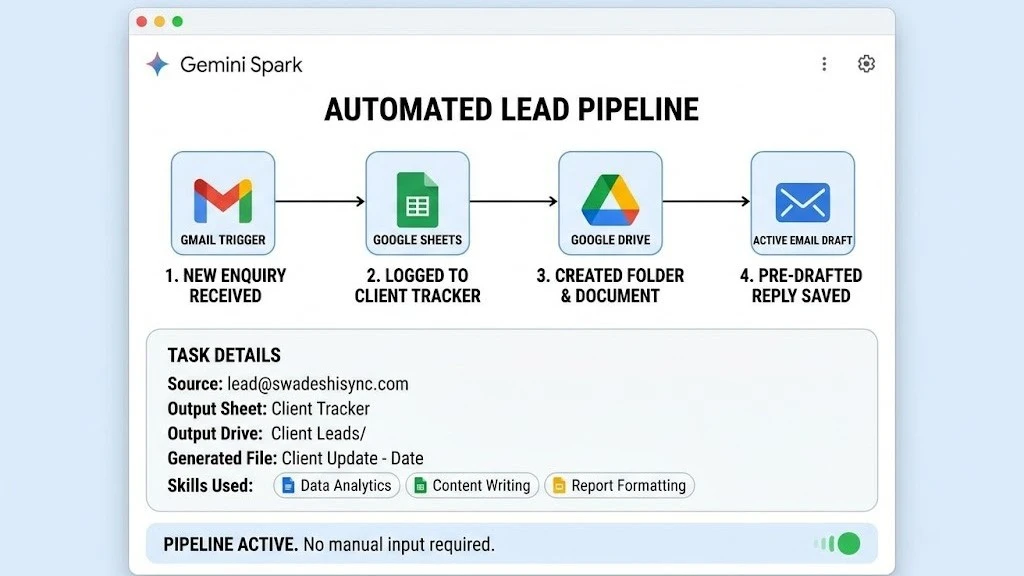
- Event-driven triggers: fire when a condition occurs. Example: when a client enquiry arrives, log it to Sheets, create a Drive folder, and draft a reply.
Important quirk: the manual schedule builder currently supports only time-based triggers. Conditional event triggers must be created by describing them to Spark in chat. Google also notes that scheduled tasks run at approximate times, and that peak-hour runs consume more of your plan’s compute allowance. Documentation lists a ceiling of 15 concurrently active tasks; beyond that, new schedules queue until something finishes.
What Can Gemini Spark Actually Do?
Gemini Spark can triage your inbox, draft replies in your writing voice, reorganise Google Drive, build and update live trackers in Sheets, assemble Slides decks, and run recurring business workflows such as lead capture. It cannot send external email or complete a payment without your explicit manual approval.
Inbox triage and drafting
- Scan the last 24 hours or 7 days and produce a structured triage digest urgent follow-ups, newsletters to unsubscribe from, general updates; each with sender, a one-line summary, why it matters, and a direct thread link.
- Pre-draft replies in your voice. The widely shared “ghostwriter” Skill has Spark analyse your last 50 sent emails to build a style card, so drafts read like you rather than generic AI copy.
- Chain across apps: a flight cancellation email arrives, Spark finds the matching Calendar block and clears it.
Spark cannot send external email autonomously. It writes the draft, saves it to Gmail, and stops. That is a structural block, not a toggle you can disable.
Workspace and file automation
- Self-cleaning Drive: dump unsorted receipts or contracts into a folder; Spark reads their contents, renames them contextually, and files them correctly.
- Template matching: point Spark at a “Weekly Report Template” Doc and it will force messy inputs into that exact layout every time.
- Live trackers: a Sheet that adds a row automatically whenever a matching email lands.
- Native decks: research a topic and assemble the Slides presentation, not merely the outline.
Lead pipelines and business operations
This is where Spark earns its subscription for freelancers and small businesses. A single configured Task can watch your inbox for service enquiries, extract the sender’s name and requested date, log the lead to a central Client Tracker Sheet, create a dedicated Drive folder, and pre-draft a pitch using your real pricing all before you have opened your laptop.
Chrome Auto Browse: Spark’s Hands on the Open Web
Chrome auto browse lets Gemini Spark drive the Chrome browser already running on your desktop, using your logged-in accounts and saved passwords to complete web errands. It shipped on 30 July 2026 and is currently restricted to Google AI Pro and Ultra subscribers in the United States only.
Google’s stated examples are bounded errands: scheduling viewings for apartments you have saved, researching flight options and beginning a booking. Marketers have pushed it considerably further scraping competitor pricing into a Sheet on a recurring schedule, pulling YouTube transcripts to build content blueprints, and auditing local competitors’ Google Business Profiles into a side-by-side comparison table.
- Safety layer: Chrome analyses page structure in real time for prompt injection hidden instructions planted on a page to hijack the agent. On detection, Spark halts and asks you to take control.
- Availability: United States only. Pro subscribers in India, Canada and the other 160+ newly supported countries have Spark but not auto browse, as 9to5Google reported at launch. Google has published no date for wider rollout.
- Known limit: it stops dead on complex login screens, multi-factor prompts, and confirmation modals it cannot parse.
Gemini Spark Price and Availability in India
Gemini Spark is available in India on Google AI Pro at ₹1,950 per month and Google AI Ultra from ₹6,500 per month. It is not included in the free Gemini tier or the cheaper Google AI Plus plan, and the rollout is batched, so eligible accounts may wait several days for the Spark tab to appear.
| Plan | India price | US price | Spark access |
|---|---|---|---|
| Google AI Plus | Entry tier | $4.99/mo | No — Daily Brief only |
| Google AI Pro | ₹1,950/mo | $19.99/mo | Yes — full access |
| Google AI Ultra | From ₹6,500/mo | From $99.99/mo | Yes — higher limits |
| Google AI Ultra (top) | ₹19,500/mo | $199.99/mo | Yes — maximum compute |
Eligibility checklist
- You must be 18 or older.
- You must use a personal Google Account; supervised, school, Workspace and corporate accounts are excluded from the consumer rollout.
- Keep Activity must be turned on in Gemini settings. This is the single most commonly missed requirement, particularly for users who received Gemini bundled through a telecom plan.
- Workspace connected apps must be manually authorised; every integration is disabled by default.
- Rollout is staged in batches, so eligibility does not guarantee immediate access.
Gemini Spark vs Claude Cowork vs ChatGPT
Gemini Spark wins on native Google Workspace integration and true background execution, Claude Cowork wins on long-document reasoning and local file manipulation, and ChatGPT wins on general-purpose flexibility. The right choice depends on where your work already lives, not on raw benchmark scores.
| Dimension | Gemini Spark | Claude Cowork | ChatGPT |
|---|---|---|---|
| Core philosophy | Always-on background worker | Interactive file and code builder | Flexible generalist assistant |
| Runtime | Persistent Google Cloud VMs | Sandboxed Linux VM | Browser and OpenAI stack |
| Runs while you are offline | Yes | Session-oriented | Session-oriented |
| Native integrations | Deep Google Workspace APIs | Full local file-system access | Broad, but often needs setup |
| Best for | Recurring cross-app automation | Long documents, code, deep reasoning | General-purpose versatility |
| Main constraint | Weaker outside Google’s ecosystem | Less native web-action infrastructure | Fewer deep first-party connectors |
The short version: if your working life already runs through Gmail, Drive and Calendar, Spark’s zero-configuration advantage is difficult to beat. If your work centres on long-form documents, contracts or codebases, the reasoning-first platforms remain stronger. If you want maximum flexibility across arbitrary tools, the generalists still win.
Real Limitations to Know Before You Subscribe
Gemini Spark’s biggest weaknesses are an opaque memory layer you cannot inspect, no way to choose which model runs a task, fragile handling of complex web logins, and heavy feature overlap with tools already free inside Google Workspace. None is a dealbreaker, but all four affect daily reliability.
- The memory black box. Spark’s Personal Intelligence layer does not expose what it remembers about you, and asking directly returns vague answers. Workaround: keep a
Spark.mdfile in your root Drive folder containing your rules, and end prompts with “read Spark.md before responding.” - No model picker. You cannot choose which model executes a background task. Spark decides silently, which produces occasional inconsistency between runs of the same workflow.
- Web portal fragility. Complex logins, multi-factor authentication and highly dynamic interfaces routinely stop auto browse cold, as early hands-on coverage has noted.
- Overlap with free features. Email drafting and thread summarisation already exist in standard Workspace tools. If that is your entire use case, Spark is hard to justify.
- Stale retrieval. Autonomous research loops sometimes surface expired job postings or dead listings, because the underlying search step is not guaranteed fresh.
How to Set Up Your First Gemini Spark Task
Open gemini.google.com, switch the sidebar from Chat to Spark Tasks, authorise your Workspace connected apps, and confirm Keep Activity is enabled. Then write one narrow Task with a defined deliverable and run it manually several times before attaching any recurring Schedule.
- Go to
gemini.google.com, or open the Gemini app on macOS, Android or iOS. - In the sidebar, switch from Chat to Spark Tasks.
- Open Settings and authorise your connected apps- Gmail, Calendar, Drive, Docs, Sheets. Confirm Keep Activity is switched on.
- Type “set up”, “get started” or “interview me” into a task. Spark will walk you through building your first Skill conversationally.
- Write one narrow Task with a defined deliverable. Not “help me with my business” try “review this week’s client emails and write a five-section status report.”
- Run it manually three times, fixing the instructions after each run. Only then attach a Schedule automation multiplies bad instructions just as faithfully as good ones.
Gemini Spark FAQ
The most common questions about Gemini Spark concern availability in India, subscription cost, email privacy and whether the agent can spend money. In short: Spark is live in India on paid plans, it cannot send external email or complete payments without your approval, and nothing is deleted if you cancel.
Is Gemini Spark available in India?
Yes. Google began rolling out Spark to Google AI Pro and Ultra subscribers in India on 29–30 July 2026, as part of an expansion to more than 160 countries. The rollout is batched, so eligible accounts may not see the Spark tab immediately. Chrome auto browse is not yet available in India.
Is Gemini Spark free?
No. Spark requires a paid Google AI Pro subscription at ₹1,950 per month in India, or Google AI Ultra from ₹6,500 per month. It is not included in the free Gemini tier or the Google AI Plus plan.
Can Gemini Spark read all my emails?
Not indiscriminately. Every Workspace integration is disabled by default and must be individually authorised. Spark accesses Gmail only for tasks you have defined, and it cannot send external email without your explicit approval the workflow halts and waits for you.
Can Gemini Spark spend my money?
No, not autonomously. Spark is structurally blocked from completing payments. When a task reaches a checkout or any other irreversible step, it stops and hands control back to you for manual approval.
What happens to my Skills if I cancel my subscription?
Nothing is deleted. In-progress tasks finish their current loop, active Schedules pause, and saved Skills switch off but your tasks, schedules and skills remain stored and are restored if you resubscribe later.
What model does Gemini Spark run on?
Spark launched on Gemini 3.5 Flash and now runs on Gemini 3.6 Flash, released 21 July 2026, orchestrated through Google’s Antigravity agent harness. You cannot manually select the model that executes a task.
Does Gemini Spark work when my laptop is closed?
Yes. Tasks execute on isolated virtual machines in Google Cloud rather than on your device. Scheduled and event-driven tasks continue running when your laptop is shut, your phone is locked, or you lose your internet connection entirely.
The Verdict: Is Gemini Spark Worth It?
Gemini Spark is worth the ₹1,950 Pro subscription if you can name at least two genuinely recurring cross-app workflows you want automated. If you cannot describe them precisely, wait a quarter the memory layer is still opaque and the flagship Chrome feature has not reached India.
Spark is the clearest consumer expression yet of the shift from AI that helps you think to AI that takes action. For anyone whose work already runs on Gmail, Drive and Calendar freelancers, small business owners, operations people drowning in recurring admin the zero-configuration advantage is real and the entry price is defensible.
It is also, plainly, a maturing product rather than a finished one. Several capabilities overlap with things Workspace already does free, and the batched rollout means even paying subscribers are still waiting. The honest recommendation is to treat your first month as an experiment: build two Skills, schedule one of them, and judge Spark on whether those two workflows actually stop consuming your attention.
Sources and Further Reading
- Google, “Gemini Spark: new Chrome browsing integration”, The Keyword, 30 July 2026; and Gemini Apps Help — Use Gemini Spark to manage your tasks and workflows. ↩
- Benchmark figures for Gemini 3.5 Flash as published on Google DeepMind’s model card, May 2026, and summarised in independent coverage of the model launch. ↩
- Google, “The Gemini app becomes more agentic”, Google I/O announcement, 19 May 2026.
- Google, Gemini Apps Help — Create and manage schedules for tasks in Gemini Spark.
Last updated: 5 August 2026. Pricing, availability and feature rollout change frequently — verify current details on Google’s official pages before subscribing.